 UPDF
UPDF
 UPDF na Windows
 UPDF na Mac
 UPDF na iPhone/iPad
 UPDF na Android
 UPDF AI Online
 UPDF Sign
 Edytuj PDF
 Zaznacz PDF
 Utwórz PDF
 Formularz PDF
 Edytuj linki
 Przekonwertuj PDF
 OCR
OCR PDF do Word
 PDF do obrazu
 PDF do Excel
 Zarządzaj PDF
 Scalać PDF
 Podziel PDF
 Przytnij PDF
 Obróć PDF
 Zabezpiecz PDF
 Podpisz PDF
 Redaguj PDF
 Oczyść PDF
 Usuń ochronę
 Otwórz PDF
 UPDF Chmura
 Skompresuj PDF
 Drukuj PDF
 Przetwarzanie wsadowe
 O UPDF AI
 Rozwiązania UPDF AI
 Podręcznik użytkownika AI
 FAQ dotyczące UPDF AI
 Podsumuj PDF
 Przetłumacz PDF
 Porozmawiaj z PDF-em
 Porozmawiaj z AI
 Porozmawiaj z obrazem
 PDF do mapy myśli
 Wyjaśnij PDF
 Głębokie badania
 Przeszukiwanie dokumentów
 Korektor AI
 Pisarz AI
 AI do zadań domowych
 Generator quizów AI
 AI Solver matematyki
 PDF to Word
 PDF to Excel
 PDF do PowerPoint
 Rozwiązania dla przedsiębiorstw
 Plan dla przedsiębiorstw
 Przewodnik użytkownika dla przedsiębiorstw
 Webinar Korporacyjny
 Bankowość
 Opieka zdrowotna
 Ubezpieczenia
 Prawo
Prawo Produkcja
 Rząd
Rząd Rozwiązania dla edukacji
 Historie klientów
 Przewodnik użytkownika
 Sztuczki UPDF
 FAQs
FAQs Recenzje UPDF
 Centrum pobierania
 Blog
Blog Sala prasowa
 Specyfikacja techniczna
 Aktualizacje
 UPDF a Adobe Acrobat
 UPDF a Foxit
 UPDF a PDF Expert


UPDF has recently introduced a major update to its online AI assistant, with new features and a more organized interface. Building on that momentum, we have added a brand-new Paper Search feature, now available in UPDF AI Online. It allows you to search and find academic papers on any topic with a few clicks. We’re thrilled to share all about this valuable new update. Read on to learn all about it!
A New Way to Search Papers
The traditional paper search methods are tedious. You need to jump between massive databases of academic papers using complex filters that don't always deliver what you need. With UPDF AI’s new Paper Search feature, you can save on hours otherwise spent on lengthy manual research.
All you have to do is enter your query in the search box. UPDF AI will gather the most relevant results in just seconds. This is a handy way for researchers to find accurate information without wasting their time and effort.
Getting Started is Fast and Simple
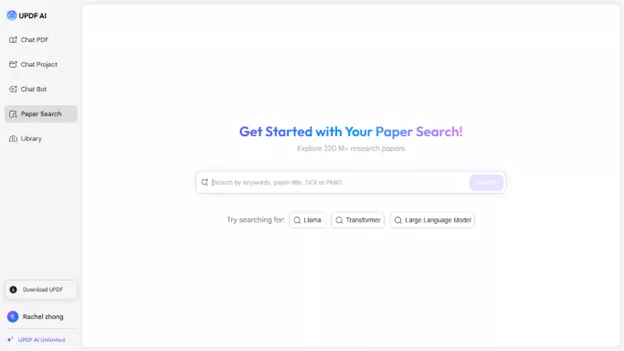
Using the Paper Search feature is straightforward and easy. You can search for relevant papers using keywords, paper title, DOI, or PMID. UPDF AI instantly searches through a huge database of academic literature. Then, it delivers the most relevant results in seconds.
This way, you can reduce the steps required to find high-quality academic papers. Moreover, students who are overwhelmed with research tasks can get reliable results quickly.
Comprehensive and Organized Search Results
Once you search, the results are easy to browse. Each paper has a quick overview of the paper’s title, authors, publication year, and citation count. There’s also a short TLDR summary that gives you a brief insight into the paper’s content. You can get more information after opening the paper. This includes a complete abstract, a list of citing papers, and full metadata. This way, you can get a comprehensive view of the paper with minimal effort.
Advanced Options to Manage Papers Productively
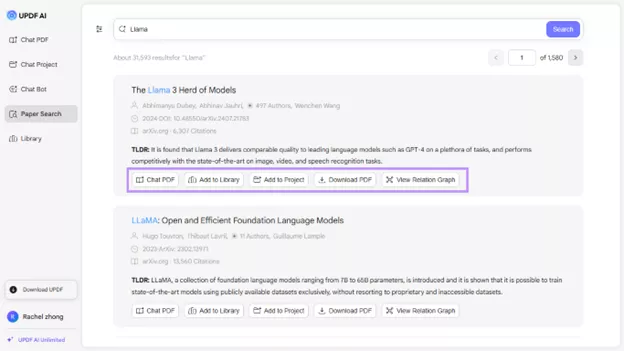
The Paper Search feature is not just limited to searches. It also offers various options to handle documents more productively. These are available directly in the search results and include:
- Chat PDF: With this feature, you can upload the research paper to UPDF AI and ask any questions about it. This helps you understand complex ideas quickly. Moreover, you can extract any information without having to read through the entire paper.
- Add to Project: You can also add your papers to one project. You can then chat with several PDFs at once using the @ symbol within a single chat interface.
- View Relation Graph: This option helps you understand the connection between research papers based on their similarity, references, and citations. So, you can find related studies more quickly.
- Online and Offline Access: You can download the papers to view them offline. You can also build an online library in UPDF Cloud to access the documents from any other device.
In The End
The Paper Search feature is now available in UPDF AI Online. It features flexible search options and accurate results. This makes it a productive way to speed up literature searches. Now, researchers can find exactly what they need in a matter of seconds. They can also understand the papers faster with the built-in advanced tools. Give it a try! Visit UPDF AI Online now to experience this feature firsthand!