 UPDF
UPDF
 UPDF for Windows
 UPDF for Mac
 UPDF for iPhone/iPad
 UPDF for Android
 UPDF AI Online
 UPDF Sign
 Edit PDF
 Annotate PDF
 Create PDF
 PDF Form
 Edit links
 Convert PDF
 OCR
OCR PDF to Word
 PDF to Image
 PDF to Excel
 Organize PDF
 Merge PDF
 Split PDF
 Crop PDF
 Rotate PDF
 Protect PDF
 Sign PDF
 Redact PDF
 Sanitize PDF
 Remove Security
 Read PDF
 UPDF Cloud
 Compress PDF
 Print PDF
 Batch Process
 About UPDF AI
 UPDF AI Solutions
 AI User Guide
 FAQ about UPDF AI
 Summarize PDF
 Translate PDF
 Chat with PDF
 Chat with AI
 Chat with image
 PDF to Mind Map
 Explain PDF
 Scholar Research
 Paper Search
 AI Proofreader
 AI Writer
 AI Homework Helper
 AI Quiz Generator
 AI Math Solver
 PDF to Word
 PDF to Excel
 PDF to PowerPoint
 Enterprise Solution
 Enterprise Sign
 Enterprise AI
 Enterprise Plan
 Enterprise User Guide
 Enterprise Webinar
 Banking
 Healthcare
 Insurance
 Legal
Legal Manufacturing
 Government
 Education Solution
 Customer Stories
 User Guide
 UPDF Tricks
 FAQs
FAQs UPDF Reviews
 Download Center
 Blog
Blog Newsroom
 Tech Spec
 Updates
 UPDF vs. Adobe Acrobat
 UPDF vs. Foxit
 UPDF vs. PDF Expert


Staring at a blank document at midnight, many students wonder how to find sources for a research paper that are actually credible and relevant. Finding reliable sources is often the hardest part of academic writing because it requires accuracy, authority, and proper citations. Common struggles include time-consuming searches, irrelevant or outdated papers, and overwhelming amounts of information from search engines.
This is where tools like UPDF AI Online can help by quickly summarizing and guiding you to useful references - read Part 2 to learn more or click the button below to try it. This article aims to simplify the process and show practical ways to find trustworthy sources efficiently.
Part 1. Key Qualities of a Strong Research Source
A high-quality research source forms the foundation of a credible and well-structured academic paper. Knowing how to find research paper sources helps you avoid unreliable information and ensures your arguments are supported by trustworthy evidence:
- Credibility: A good research source is written by qualified authors or published by reputable journals, universities, or organizations. Author credentials and publisher reputation indicate the reliability of the information.
- Accuracy: Reliable sources support claims with evidence, data, and proper citations. Facts should be verified through references or other trusted publications.
- Relevance: The source must directly relate to your research topic and research question. Relevant sources strengthen arguments instead of adding unnecessary or off-topic information.
- Objectivity: A strong research source presents information in a balanced and unbiased manner. It avoids personal opinions and clearly distinguishes facts from interpretations.

Part 2. Finding Credible Sources With UPDF AI Online
Finding credible sources doesn't have to mean endless searching and filtering anymore. Once you understand what makes a good research source, the next step is choosing a tool that can simplify and speed up the process. UPDF AI Online is an AI-powered research paper source finder to help students and researchers find relevant academic sources efficiently.
Using its Paper Search feature, you can explore scholarly articles, summaries, and key insights in one place. Instead of manually reviewing dozens of papers, UPDF AI Online analyzes research content, highlights important points, and helps you identify useful references faster. This makes it easier to stay focused, reduce information overload, and build a well-supported research paper with confidence.
Features Offered By UPDF AI Online
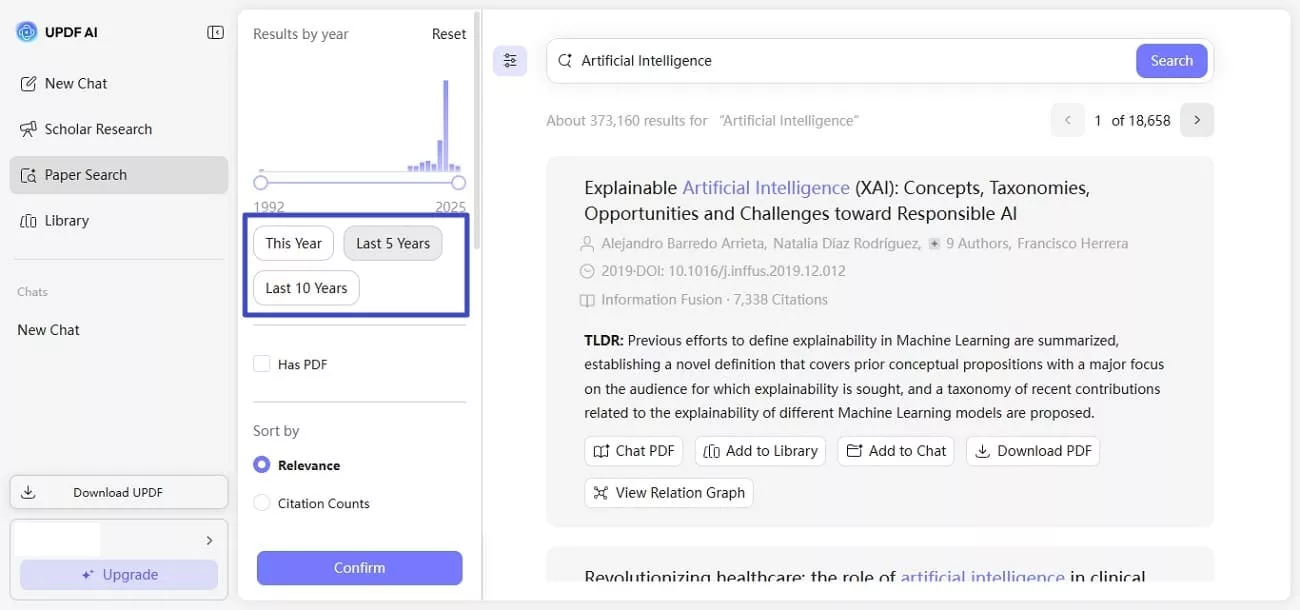
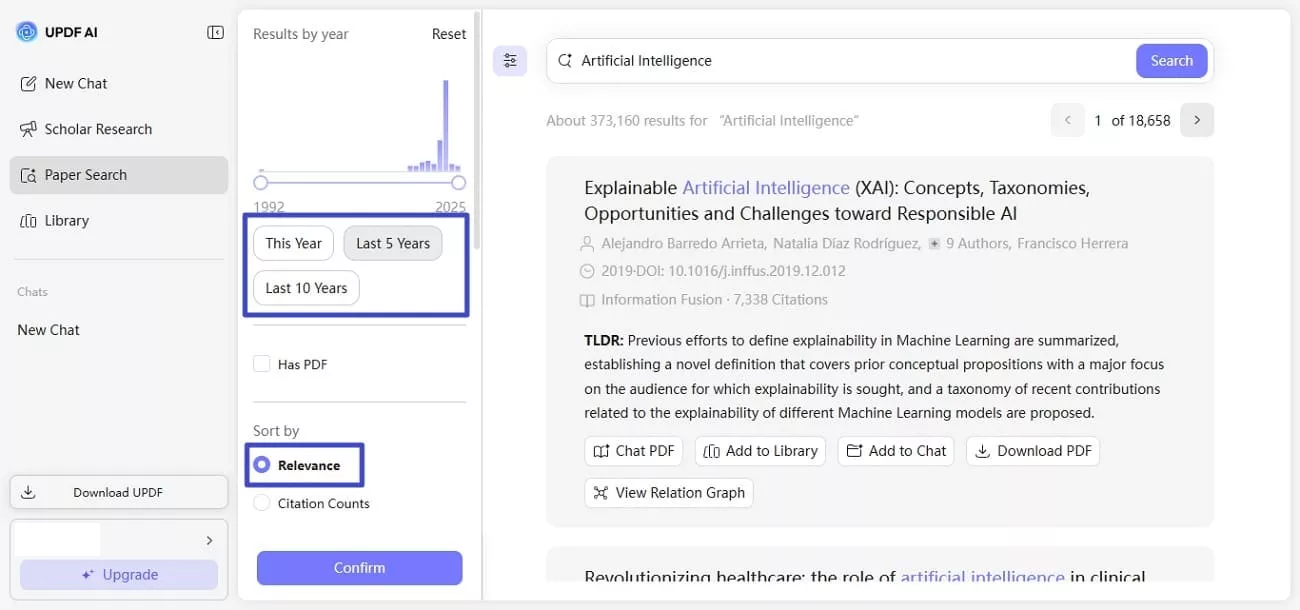
1. Search Results By Year
This feature allows you to filter research papers based on publication year, making it easier to find the most recent studies. It is especially useful for subjects where up-to-date data and trends are essential.
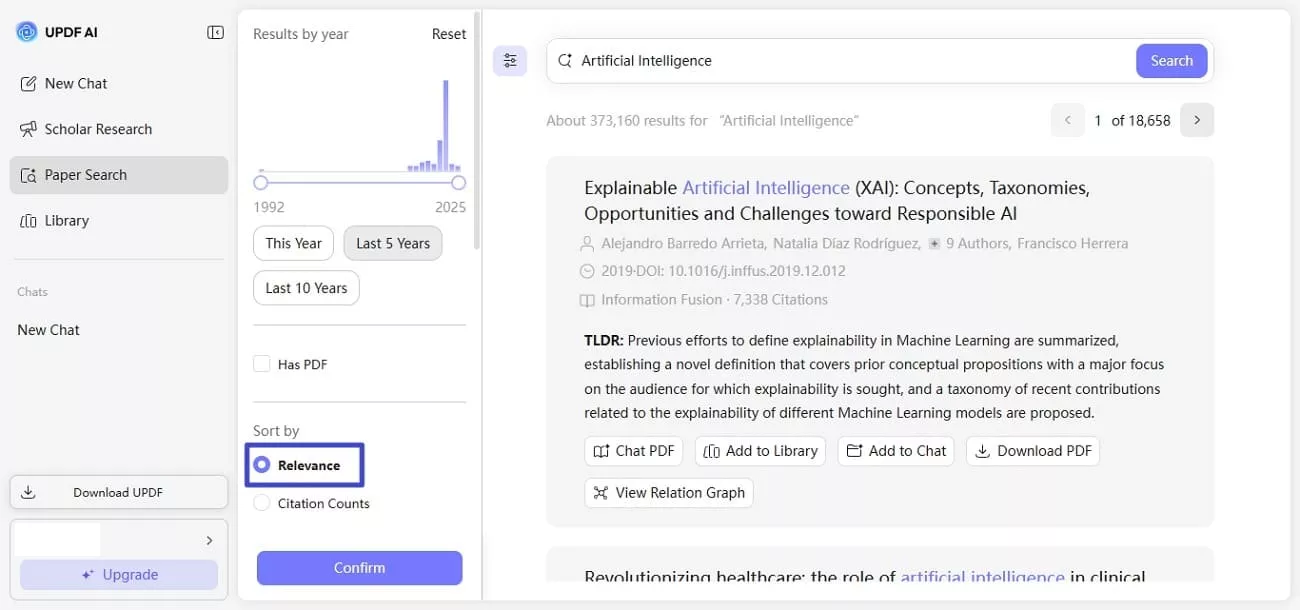
2. Search By Relevance
UPDF AI Online prioritizes papers that closely match your research query. This saves time by reducing irrelevant results and helping you focus on the most useful sources.
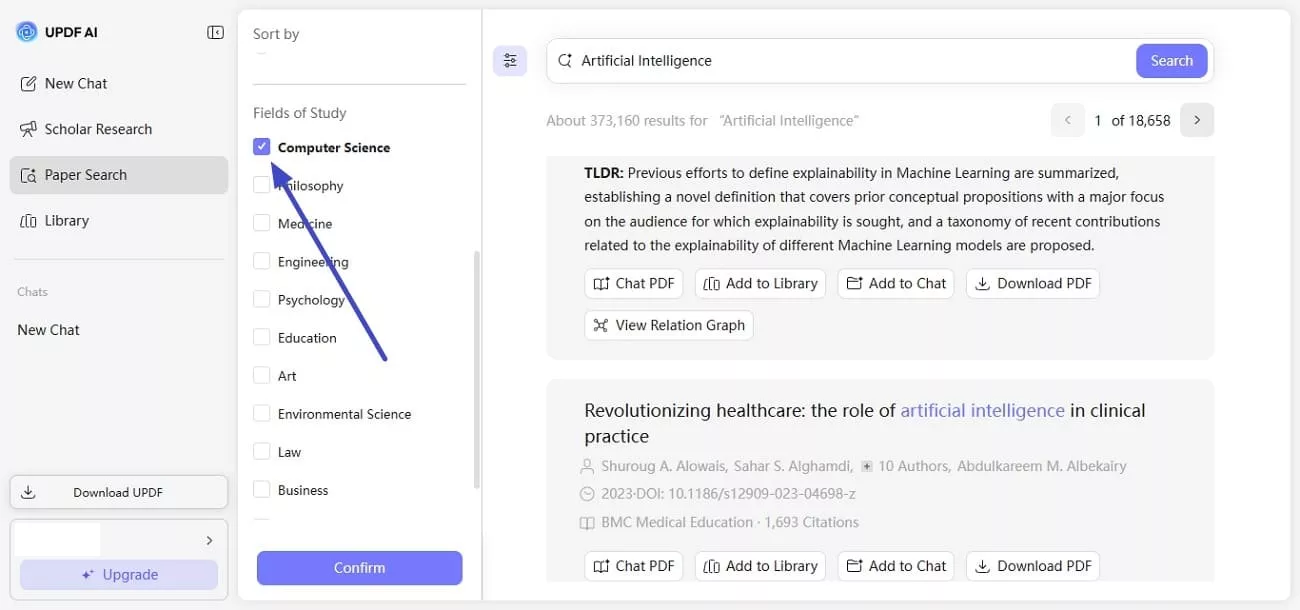
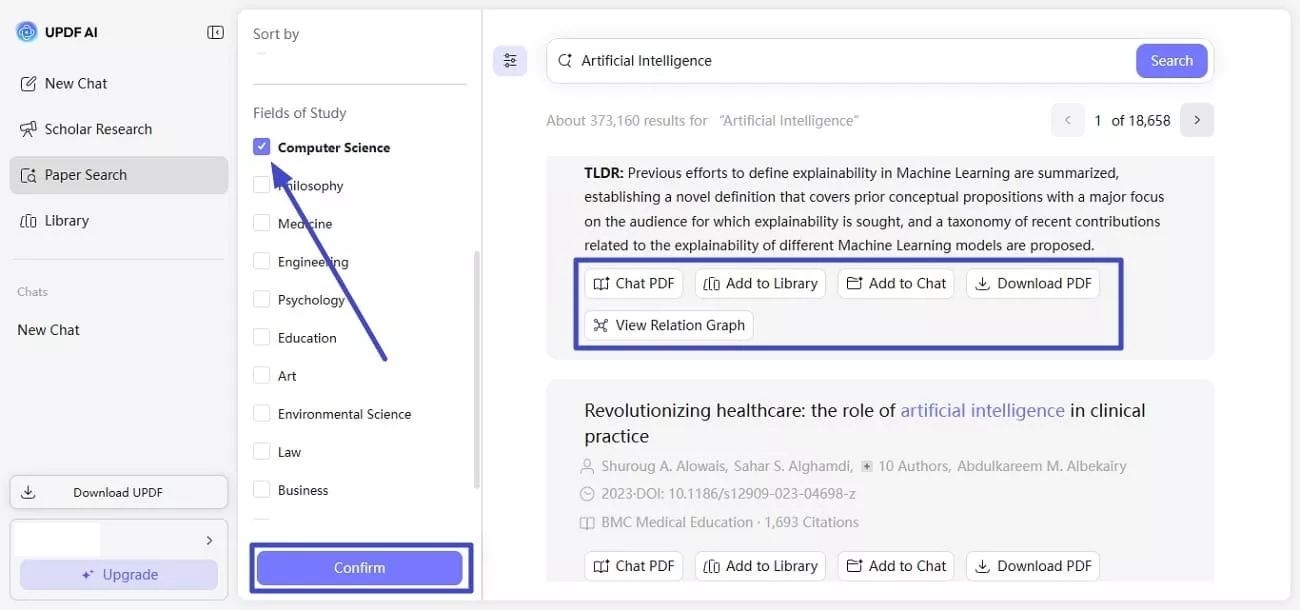
3. Multiple Fields of Study Option
You can search across different academic disciplines or narrow results to a specific field. This flexibility is helpful for interdisciplinary research topics.
4. Chat With PDF
All the search results will be displayed on the interface, and UPDF AI Online allows you to directly interact with them with the Chat with PDF feature - it lets users who wonder how to find sources for a research paper to ask questions directly. It helps you quickly understand complex sections without reading the entire document.

5. Add Result to Library
This option allows you to save selected papers to your personal research library. It keeps your sources organized and easily accessible for later use.

6. Download Result PDF
You can download full research papers in PDF format for offline reading. This ensures you have permanent access to important sources.

7. View Relation Graph
The relation graph visually shows how different papers are connected through citations or topics. It helps you discover related studies and expand your research efficiently.

Steps for Finding a Source for a Paper Using UPDF AI Online
Having learned about this incredible research paper source finder in detail, let us now have a look at the step-by-step guide on how to use it for finding source papers:
Step 1. Access Tool And Select Feature
To initiate the process, access UPDF AI Online on your web browser by clicking the button below. Now, click the Web App button on the top-right corner to sign up.
Step 2. Enter Relevant Keyword and Search
After successfully signing up and logging in, you will be redirected to the main interface of UPDF AI Online. Switch to the Paper Search tab.
On the next screen, you can choose between two modes: Keyword and Question. Since you want to find sources for a research paper, select Keyword mode.
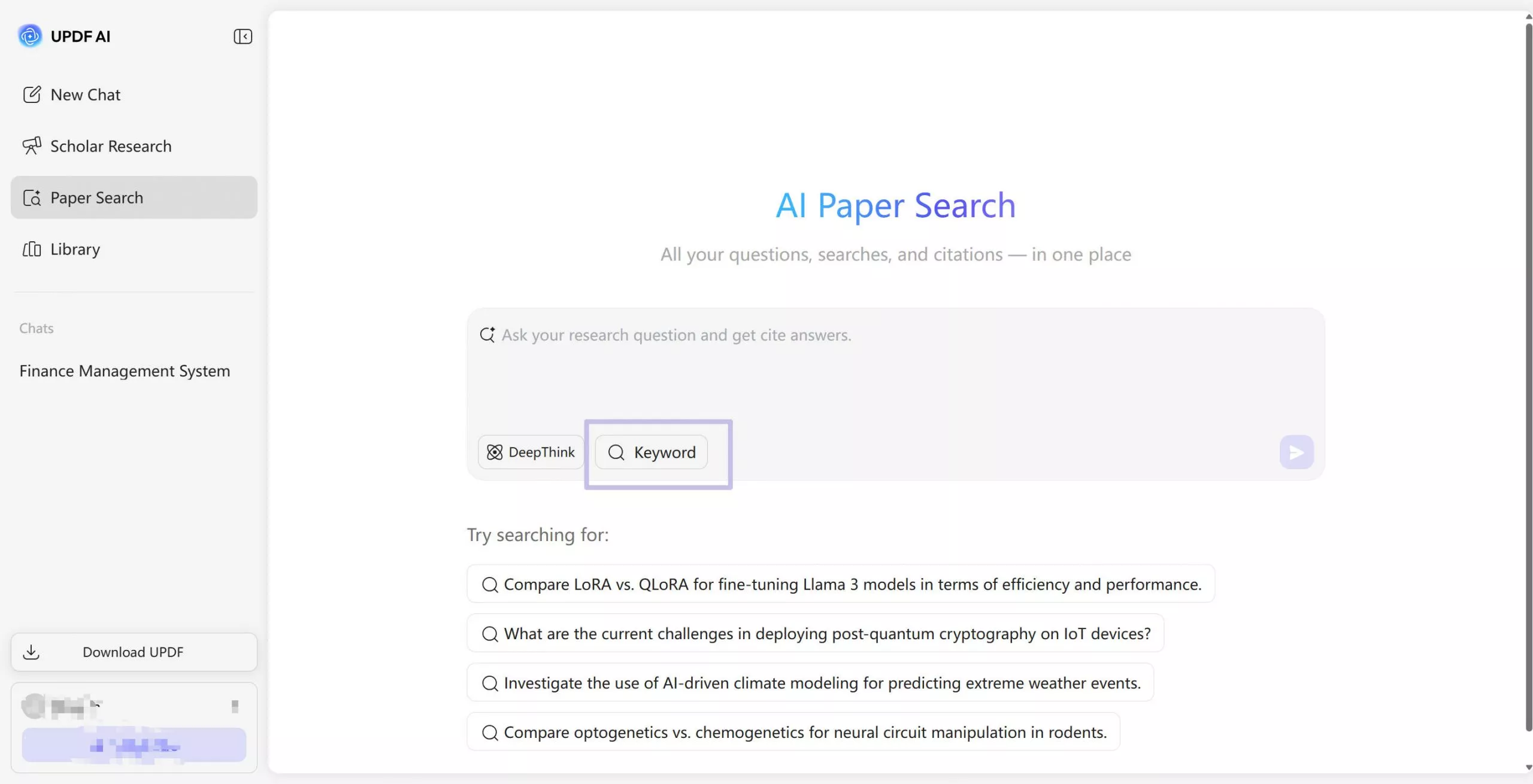
Enter the relevant keyword or research topic in the search bar, then press Enter to start the process.
Step 3. Narrow Down Search
Once you get the results, you can narrow down the search by pressing the "Settings" icon and selecting year or relevance from the left.
Step 4. Sort By Field of Study and Explore Results
Scroll down a bit and choose the field of study by ticking the checkbox and pressing the "Confirm" button. Once the results are visible, users who wonder how to find research paper sources can download the reliable source as a PDF or add it to the library.
Part 3. Why UPDF AI Online Stands Out for Academic Source Discovery
After exploring individual features, it's important to understand why UPDF AI Online is particularly effective as a complete research solution. Mentioned below are some of the reasons why this online tool is the tool that you need:
- All-in-One Research Workflow: UPDF AI Online combines paper searching, reading, and analysis within a single platform. This eliminates the need to switch between multiple tools during the research process.
- Understanding-Focused Research: Instead of only listing papers, the platform helps users understand key ideas and findings. This makes it easier to determine whether a source truly supports your research topic.
- Smart Relevance Evaluation: UPDF AI Online reduces manual effort by highlighting the most relevant content within each paper. Researchers can quickly assess usefulness without reading entire documents.
- Built for PDF-Based Academic Work: The tool is designed specifically for PDF-heavy academic workflows. Features like Chat with PDF make reviewing and extracting insights from scholarly papers more efficient.
Part 4. Avoiding Research Pitfalls with Smarter Source Selection
Even experienced researchers can make mistakes when gathering sources, especially under time pressure. Understanding these common issues can significantly improve the quality of your research. Provided next are some of the common mistakes that users make and how UPDF AI Online research paper source finder helps in resolving them:
- Relying Only on Abstracts: Many researchers judge a paper solely by its abstract, which can be misleading or incomplete. UPDF AI Online helps by analyzing full PDFs and providing AI-guided summaries for deeper understanding.
- Using Outdated or Irrelevant Sources: Older or off-topic papers can weaken academic arguments. UPDF AI Online's relevance and year-based filtering help you identify timely and topic-specific research.
- Over-Collecting Without Analysis: Gathering too many papers often leads to confusion and wasted time. UPDF AI Online focuses on understanding key points so you can evaluate sources before saving them.
- Lack of Insight from Raw PDFs: Reading dense academic PDFs can slow down the research process. AI-guided summaries simplify complex content and highlight essential findings efficiently.
Conclusion
To sum it up, this article provided a complete guide on how to find sources for a research paper, covering what makes a good source, common research mistakes, and practical ways to streamline the process. It also introduced UPDF AI Online as a powerful tool that combines search, analysis, and PDF interaction, helping students and researchers save time. This helps focus on relevant content and build stronger, well-supported papers.








 Enrica Taylor
 Lizzy Lozano
 Delia Meyer

 Engelbert White
-celsiusisbetter